The Sign-In Page That Lives on Your Dish
How the sign-in page loads from your kit's router, how your rental code gets a device online, and which parts still need an internet connection. Plus the campsite scene you can try here.
Join the kit's WiFi, and the sign-in page can open while ordinary websites still won't load. Your rental code goes there, rather than into the WiFi settings. The page lives in the router attached to the dish; getting through it still needs a working connection beyond that router.
What you actually see
The WiFi is open. There is no password to type, no card taped to the dish with a passphrase on it. In the code-gated setup shown here, the router restricts a new device's internet access until it checks in. A short list of permitted services, including the portal's own server, stays reachable through that restriction.
Devices use small connection checks to decide whether a network has internet access. Our router directs known check addresses to its local page. That is what can make the sign-in sheet appear by itself. The automatic prompt depends on the device recognizing the network as one that needs a login.
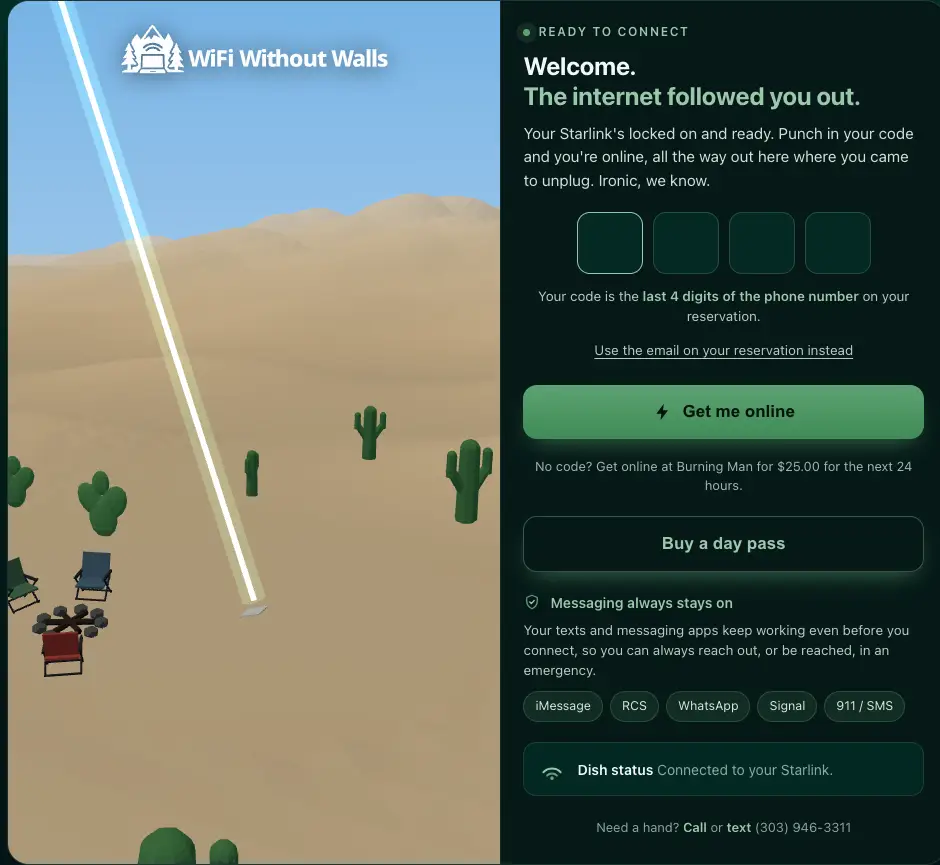
The figures and day-pass offer in these screenshots are a captured example. Check your live reservation or portal for the terms and options available to you.
Your code is the last four digits of the phone number on the account that booked the rental. The email on that account works too, including when the booking has no phone number. If somebody else booked, ask them for the code or email rather than entering your own. It is a shared secret you can say out loud across a campsite: you hand it to the people you came with, and they each put it into their own device.
The router's allow-list includes servers used by iMessage, RCS, WhatsApp and Signal. It gives those services a route past the sign-in gate, subject to a working satellite connection and the services themselves. The screenshot's claim that messaging "always stays on" goes further than that configuration can support.
Apple's messaging guide distinguishes iMessage, which uses WiFi or cellular data, from carrier-provided RCS and SMS/MMS. Allowing app traffic through a router cannot guarantee that an ordinary or emergency text will arrive. Test the messaging method you intend to use before relying on it away from cell service.
Once you are in, the page turns into a dashboard for the rental itself.
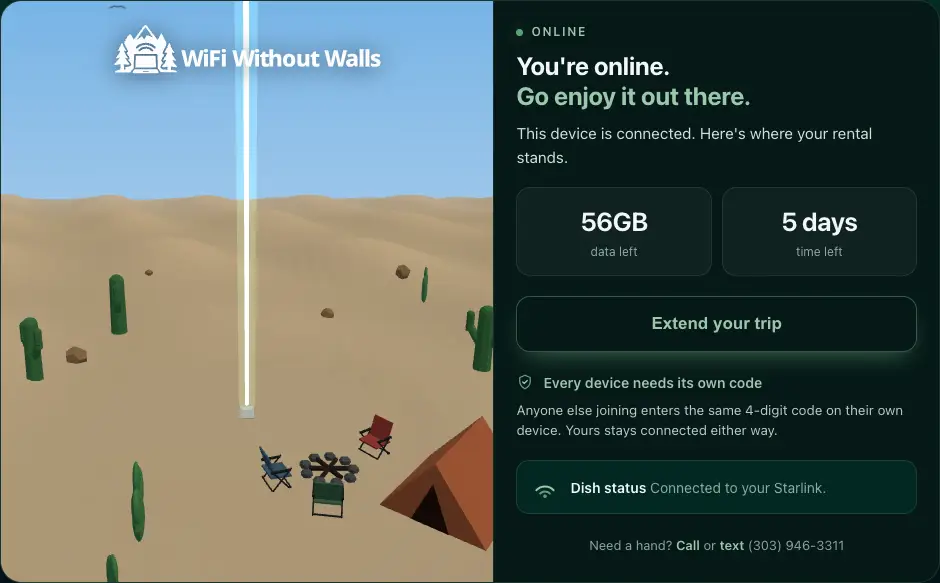
Data left, time left, and a way to add more days when an extension is available. Those details come from our server rather than from the file stored on the router. The page also waits for the server to confirm that top-ups are enabled before showing a purchase button. A missing button alone does not tell you how close the rental is to its data cap.
Rental top-ups and extensions use the booking account's saved payment method. Top-ups require the four-digit reservation code before charging, so nobody on the network can bill the card by accident.
While a rental is live, you can add another Wi-Fi network from the page. Give it a password or create one with no sign-in page. The network on the card in the kit stays available for everyone else.
The campsite follows the dish
The artwork behind those screenshots is a live 3D scene. A desert setting gets cacti and dunes; a forest setting gets trees. The scene can adapt to the dish's last known position, the local time, the season and reported weather. Southern hemisphere flips the season, so a January rental in Patagonia gets summer rather than winter. There are a few holidays hidden in there too.
The page gets those conditions through our server, which can reach services outside the router's allow-list. It looks up the latest location recorded for the rental, resolves the landscape type, and requests weather for that point. The page receives the answer instead of contacting a weather service directly.
That leaves room for the picture to be wrong. A last known position can lag a move. If the weather request fails, the code falls back to a clear sky; if location is missing, the scene can fall back to a forest. The campsite is an illustration shaped by available data, so a sunny sky on screen should not decide whether you bring in the chairs.
The panel below loads the same scene bundle the portal serves. Pick a biome (the landscape type), a time of day, a season, the weather, or a holiday, and the terrain, sky, vegetation and fire rebuild in place. The dropdowns come from the scene's own tables, so the options are exactly what it can draw. Here on the blog it starts without a rental's location or weather, using the scene's defaults and your browser's clock.
Why it is built strangely
A page served entirely from our website would need to reach that website before it could show you anything. Putting the base page on the router removes that first dependency. Your device can load the layout, logo, still artwork and sign-in controls over local WiFi, even when our server is unreachable.
Those pieces live in one HTML file. The styles and core script are inside it, the images are embedded, and the icons are hand-drawn shapes rather than an icon font downloaded elsewhere. The router serves that file locally. We also serve a copy from our own domain as a fallback, generated by the same page renderer.
The 3D scene adds a separate download from our main domain, which the router allows through before sign-in. Keeping it outside the router's size-capped page means the animation still depends on our server being reachable. The embedded still artwork remains while it loads or if the download fails. Devices without 3D support, or with reduced motion enabled, keep the still picture. The phone in somebody's glovebox needs the sign-in controls more than it needs a moving campfire.
If signing in still needs our server, what does storing the page locally actually solve?
It solves getting the page onto your screen. When you press the connect button, the page still needs the router to identify your device. It sends that identity and your credential to our server, which checks the rental and asks Starlink to allow the device through. Only after a successful response does the page complete the sign-in flow. A failed server request can leave you looking at a page that cannot get you online yet. Data readings, purchases and extensions also need their server requests to succeed.
That distinction helps when something goes wrong. A credential-mismatch response means checking the phone number or email on the booking. A network error means the request failed, even if you typed the right code. Seeing the locally served page tells you that your device reached the router; it does not establish that the satellite connection or our service is working. Loading a fresh ordinary website after sign-in checks the next part of that path.
The pipeline behind the local file is deliberately boring. One function renders the page to a string. A script minifies it and writes it to a file, which we commit to the repository. Our infrastructure config uploads that committed file to the dish's router configuration. Minification keeps the router copy small.
Committing a generated file is usually a smell. Here it makes the exact bytes headed for the dishes visible in code review. The cost is keeping that copy in step with its source: the renderer reads no clock and takes its settings as inputs, so the same inputs produce identical output. Our automated check renders it again and fails if the result differs from the committed file. A second check rebuilds the scene bundle and compares that too. Those checks catch stale files; they cannot prove that a particular phone will sign in on a particular dish.
The sign-in can record a handover
For a pickup or local delivery, there is no parcel scan to tell us that you have the kit. The portal can supply another signal: a sign-in request for the assigned dish, with a matching rental credential.
Within the rental dates, that request can advance an eligible order from preparation to handed over. Powering on a dish alone does not do it. The check is scoped to that dish's rental and excludes shipping orders, whose carrier tracking serves a different job. It records the local handover without treating an early power-on or a request about somebody else's dish as permission to start a rental.
What these screenshots show
The screenshots were taken from the fallback page served from our domain, with the router's answer identifying the connecting device supplied locally. That capture setup shows the page and its rental views, but it does not demonstrate a phone signing in through hardware in the desert.